Showing posts with label PowerPoint. Show all posts

Friday, 30 January 2015

CO15 MOOC - February 6-8, An Excellent CPD Opportunity for Educators!

I am thrilled and proud to be one of the 35 presenters at the upcoming 6th annual 3-day MOOC, Connecting Online 2015, hosted and organized by the incredible Dr Nellie Deutsch. My presentation is called The EVOlution of Jan!

You can register for this webinar, held on Friday February 6th at 3pm GMT (4pm CET), by clicking the link below:


I have been presenting at this exciting free annual event since 2011 and this is my fourth time in its 6 year history.  The platform is WizIQ and the event this year is held from 6th-8th February.  The webinars focus on instruction and learning.  The theme for this year is 'connecting online for collaborative work'. The presenters have prepared some great sessions for you to attend, and share their experiences.

I do hope you will be inspired to join in the fun with the presenters below!

Lots of useful information about CO15 has been shared in the Smore flyer, created by Dr Nellie Deutsch.  She has invited her PLN and presenters to share this information so that the MOOC will be attended by as many teachers from around the world as possible!

Smore promotional CO15 flyer with youtube video link reproduced below with kind permission from Dr Nellie Deutsch, and the direct link is also here: https://www.smore.com/zts4g

You can click on each of the presentations in the Smore poster below, and you can register to attend any of the webinars.


My CO15 presentation is viewable below as a clickable and downloadable ebooklet via Youblisher. Resources can be found on my wiki page here.The recording can be found here.
Thanks to everyone who attended my session, and for those who have viewed the recording.  A very special thanks goes to my moderator for the session, the tireless and inspirational Dr Nellie Deutsch!!!


The EVOlution of Jan!


SMORE
If you are interested in finding out more about Smore, one of  the co-moderators on the EVO Crafting the ePerfect eTextbook, Maria Jesus Garcia San Martin   has written an informative blog post with video tutorial to show you how it can be used. It is called First Steps on Smore.


Wednesday, 21 January 2015

The EVOlution of Jan!


I am honoured and delighted to be invited by Dr Nellie Deutsch to present at the Bi-monthly webinar WiZiq sessions held by IATEFL YLT Sig.  I have created a brand new session for this meeting and will also present it at Connecting Online 2015 econference in February.

This talk is about how my life has been transformed by the TESOL Electronic Village Online yearly sessions that I have been attending regularly, since 2009.  It has been a transformational journey of liberating learning opportunities, exciting experiments with new tools, and  inspirational encounters with the wonderful groups of moderators, and participants from each of the sessions.

This special presentation is my personal and heartfelt ............

......... to everyone who has been involved with the sessions I have attended as a participant, and most recently for the past two years, as a member of the moderating team for the EVO Crafting the Perfect eTextbook session.

I aim to outline what I have personally learned from participating in these sessions and hopefully this will encourage more people to join and attend in future years.  The Electronic Village Online sessions are usually held for five weeks in January - February each year.  They are open to teachers from around the world and a huge variety of topics are discussed and explored.

I have recorded my thoughts and experiences on all the EVO sessions I have ever attended in this blog, and it constitutes a learner's diary, an evolving journey of exploration and enlightenment!  You can click on the EVO tags below the post, and you will be taken to my blog posts, and feedback on each of the sessions.


Webinar Update:
Thanks very much to all the attendees of my webinar (16).  I really enjoyed the session, and here is a screenshot from the webinar at the end.


A very special thanks goes to Dr Nellie Deutsch for being such a fabulous moderator, adding all the URLs and links as they came up, and for dealing with all the chatbox comments in such an expert manner. 

All my links have now been posted on a special wiki page I have created, called CO15 Links and ResourcesHERE.
 
Link to RECORDING: YLT Webinar: The EVOlution of Jan!The recording lasts just over one hour, so I do hope you will view it!

I tried to join in with the chat as much as possible, as this is a part of doing webinars which is so much fun - interacting with a live audience.  Sorry if I missed a few comments here and there!


Sunday, 28 October 2012

Fluffy - A 21st Century Feline Techie!


Fluffy has at last finished his first major Slideshare web presentation, which I am delighted to share with you. It was great fun to help Fluffy with this particular project, based  on a few tools which can visually enhance your lessons and presentations..

Wednesday, 5 October 2011

The Truth Is Out!

Thank you to everyone who has attempted to guess which facts are NOT true about my life. I made a Jing video and wrote a post about the blog challenge here. Dave Dodgson who started off the Tuth or Lie? blog challenge has posted up his answers to the challenge on his blog here.

Thanks to Dave for this very interesting and worthwhile challenge. I have visited new blogs and connected with other teachers from around the world, and that has been fun.

Here was the challenge:
  • Post a video, audio recording or just a regular post on your blog in which you state 5 facts about yourself - 3 truths and 2 lies.
  • Invite your PLN to quiz you and speculate on what the lies are!
I have a big confession to make. I have just realised that only 2 facts are strictly true, so there are 3 false statements in my Blog Challenge: Truth or Lie? post. I apologise for any confusion!!

Fiona has guessed two facts correctly! So has Sue from ESOL Courses. Well done!

Here are the TRUE facts as seen in the individual Poweroint slides below. I used Jing to screen capture each slide as an image.

Statement 1

I originally said I cultivated 100 litres. Maybe one day it will be true and olive oil cultivation will be my full time day job!

Statement 2

I said I had been blogging for 5 years. In fact it will be 3 years very soon.

Statement 3

This fact is true! You can see my blog post called Janet's Motorcycle Diaries, which describes a trip I made from Abruzzo to England last year. I and my hubby used to be members of a motorcylce club and we went touring all over Europe! I have been to Assen twice on the back of a Triumph Trophy 1200 motorbike, and I have seen Valentino Rossi win the Moto GP there. Both trips were amazing and I loved the exciting atmosphere at the Moto GP race track. I must find some old photos and add them to this post!

Statement 4

Yes, this statement is absolutely true!

Statement 5

I said I had been to all the places on the red dots. In fact, I haven't been to all these places but......my Janet's Abruzzo Edublog HAS been viewed by people from over 100 countries in the world, as you can see from this Clustrs map, taken from my blog's Main page!!!

I look forward to finding out the truth about the other bloggers who have taken up the challenge.

Monday, 3 October 2011

Blog Challenge: Truth or Lie?


Challenges are hard to resist sometimes especially when you can kill two birds with one stone! Dave Dodgson from the super Reflections of a Teacher and Learner blog has set up an interesting Truth or Lie? challenge amongst fellow bloggers. You can find out more about this fab challenge and view links to Dave's and other bloggers responses on this post: This is My Truth (or is it?), Tell Me Yours - A Blog Challenge.

I found this Dilbert comic strip via Twitter today, and thought it is very apt indeed for this post. Thanks to @ Sandymillin for tweeting it!

Dilbert.com

The Challenge
Here is the challenge:
  • Post a video, audio recording or just a regular post on your blog in which you state 5 facts about yourself - 3 truths and 2 lies.
  • Invite your PLN to quiz you and speculate on what the lies are!
To complete this challenge, I first made a Powerpoint presentation and then I used a Jing screencast to video capture the slides. I am still very much a newbie Jing user and it took me a few attempts and deletions to get it right!! I am not sure about the sound. Hopefully you can hear it ok.

In my presentation, I say five facts about my life, but only three are true! Can you guess which two facts about me are NOT true?? I'll post up the answers some time this week. I hope to use this video as a new "Introduction to Janet" for my next class.


Unable to display content. Adobe Flash is required.

Sunday, 3 April 2011

IATEFL Brighton - An Exclusive Interview with Janet

With IATEFL Brighton looming in less than 2 weeks, it is time for an interview with Janet, the blogging teacher from Abruzzo.

Laura Lidiana, an extremely close contact from Civitaquana, Abruzzo, very kindly agreed to interview her. Below is a faithful rendition of the interview which took place in Oxford, England yesterday.

LL: Are you ready for IATEFL Brighton?

Janet: No, I'm not.

LL: Oh, I see. Why not?

Janet: Well, it's been a bit hectic the past few weeks what with a few virtual conferences and face to face workshops that I have had the great pleasure to present at, so I haven't had enough time to get down to doing it completely.

LL: What is the title that you are presenting?

Janet: It's on one of my favourite teaching topics!! It's called "Teaching Idioms Effectively with Web 2.0 Tools".

LL: When are you presenting?

Janet: I'm presenting on Sunday April 17th at 16.55pm.

LL: That sounds fab! Have you done your research for your presentation?

Janet: Yes, I have. I've already done about 15+ hours of collating information, reading, finding some useful references and so on.

LL: Well, that sounds positive. How about your slides. Have you organised them yet?

Janet: I've already got about 15 done, but ideally I'd like to have about 30 - 35 slides ready.

LL : How do you actually prepare for a major presentation like IATEFL Brighton?

Janet: I have a lot of brainstorming sessions first, where I just sit down with a pen and an A4 piece of paper. I just sit and stare at the blank piece of paper and wait for inspiration to happen. It usually does happen and then there is an explosion of ideas, and that's when it gets a bit manic. I jot everything down using circles, arrows, bubbles and all sorts! After that, it's linking, linking and more linking. Then I stop, and leave this first basic draft.

LL: I see. Then what happens next?

Janet: Well, then I wait for the next stage to miraculously happen, and as soon as I get an inkling that inspiration is on the cards, I sit down again with the original draft and then start to sift through all the many ideas. That is my second draft. After that, I do a third draft, always following the same sort of procedure until I finally have the Final draft with the ideas I definitely want to include in the presentation. All this takes quite a few hours!!

LL: That sounds good. Ok, so are you on track to deliver the presentation in 10 days or so?

Janet: I have no choice. It has to be ready. I usually work very well to a deadline and my pre - final or penultimate deadline is Sunday April 10th. That will give me 4 clear nights to finalise everything to my complete satisfaction.

LL: Have you been working hard on it recently?

Janet: Yes, I've been a bit snowed under with work and family commitments, and I have been burning the midnight oil. I hit the sack at 2am last night. I suddenly got inspired at about midnight and I couldn't stop! I was doing screenshots of images, looking through all my folders and I was as busy as this bee below!

LL: My goodness, DO make sure you don't overdo it, as you need to be on the ball for Brighton, don't you??

Janet: Absolutely!!

LL: Do you mind my asking? How come it's taken you so long to present at IATEFL in England?

Janet: Yes, that's a good question. My tutor in Hastings at a Teacher Refresher course in the early 1990s suggested back then that I should apply to present at IATEFL. The only thing that stopped me from actually following his excellent advice was myself, that is the honest answer. I did not push myself, I didn't really want to, nor need to step out of my "comfort zone", as I was extremely happy the way I was back then, in my pre-technology era.

LL: Do you regret not pushing yourself in your pre-technology era?

Janet: It's best not to look back with regret at things that are not possible to change now, as that is detrimental to the present.

LL: Ermm, I don't think you have really answered this question, so if you don't mind, I will ask you again.

Do you regret not pushing yourself in your pre-technology era?

Janet: What can I say? I was very happy back in those days and I am happy now. That's my final answer.

LL: Right, ok. I feel you are hedging somewhat, but ok, let's move on. So what prompted you to start doing so many presentations recently?

Janet: I was inspired by some very kind members of my PLN who invited me to participate in virtual conferences and Face to Face conferences. They had the confidence in me that I would be able to deliver on a big stage in front of many educators from around the world.

Eg
  • Virtual Round Table in 2010, and 2011
  • Reform Symposium in 2010,
  • Connecting Online 2011
  • TESOL Italy - Rome National Convention 2010
  • Tesol Italy L'Aquila in 2010, and 2011
I feel very happy that I have presented at all these venues. I would never ever have believed I would do this before 2008, when my life changed overnight.

LL: I see! Ok, so my final question of the day is: Have you read any blog posts on presenting that have inspired you?

Janet: Yes, I have read quite a few and I am going to be reading them again over the next few days before I get to Brighton.

LL: Well, Janet - thank you for agreeing to be interviewed. I know how reclusive you are and how difficult it is to pin you down, especially with you looking after all your chickens, cats, dogs, seedlings and olive trees!
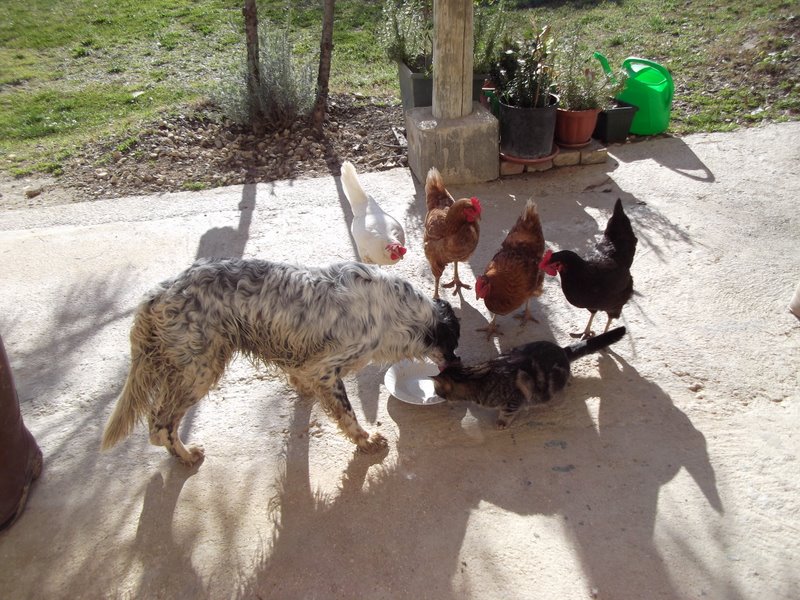
Below we can see a rather hen-pecked Kelly surrounded by his flock of followers, all trying to grab his food.

LL: I'd like to wish you good luck and I hope you enjoy Brighton!

Janet: Thank you very much Laura! See you there?

LL: Yes, absolutely! I will definitely be there.

Janet: Great, we'll have to meet up for a Montepulciano or two?

LL: Yes, that sounds fab! Or even a Trebbiano?

Janet: Maybe we won't find any Abruzzo wines in Brighton, but anyway, I look forward to seeing you there!!!

End of Interview

Link to image here.

Links to Helpful Posts on Presenting at Conferences
The Power of Presentations by David Deubel
It's Conference time, and I'm getting nervous... by Ken Wilson
How to present at a conference: Part 1 taking the first steps by Darren Elliot
How do you plan a successful presentation? by Jeremy Harmer
Death by PowerPoint (and how to avoid it!) by Seth Dickens
Improve Your PowerPoints in 45 Minutes by Seth Dickens

Thursday, 14 October 2010

Seminar in L'Aquila for Tesol- Italy Teachers: Effective Images for Powerful Activities

In front of my PowerPoint display

It was my great pleasure yesterday to present at the first TESOL seminar of this new school year for Tesol Italy in L'Aquila, Abruzzo. This meeting was organised by Annamaria, the co-ordinator of the Tesol L'Aquila group, and it was lovely to meet her in person. She welcomed me and K (who was my personal chauffeur for the day) very warmly, and then helped me to set up the computer in the designated room, which was in the newly born Resource Centre for Teachers of Foreign Languages, hosted by Scuola Media "Dante Alighieri" of L'Aquila. This fabulous resource centre has been equipped by Tesol Italy with all kinds of materials available for the teachers of L'Aquila.

The session lasted approximately 2 hours, and there were over 20 teachers who were able to attend. My presentation was entitled "Effective Images for Powerful Activities". I showed a combination of slides I have used before, and a few additional new slides. I have embedded a Slideshare below.

Feedback and Analysis
It was an absolutely amazing and very moving experience for me to be with teachers, who have been through so much. I was very happy to see all the participants joining in the activities with such a lot of enthusiasm. It was a very interactive presentation, and I liked the fact that I was able to move around everyone and see how they were getting on with the tasks I set. I think we all had some fun and the time literally flew past!

The participants did the following activities amongst others:

  • brainstorm adjectives beginning with "C" to describe qualities of an effective teacher
  • discuss the qualities of an efffective teacher
  • 20 questions "guess the famous couple" (Romeo and Juliet)
  • retell the story of Romeo and Juliet in under 50 words in pairs / groups
  • retell the story around the class with each participant using only one word (this was fun!)
  • guess the story of how a couple met
  • create a poem/short paragraph from a picture prompt
  • read a poem out aloud with correct stress patterns
  • complete half a text to recreate a full text
  • guess a famous person (George Clooney) - relevance to Abruzzo being his latest film "The American"
  • briefly touch upon the implications of "teaching unplugged" via a picture prompt
Some Web 2.0 Tools
I introduced and showed examples of the following tools (amongst others), which I had used to create special effects and or edit my own images:

create a newscast picture with tuxpi.com
create a film strip picture frame with tuxpi.com
create a magazine effect and motivational poster with bighugelabs.com (see the one above)
a mind map using www.bubbl.us

The mind map below is one I have just created highlighting the lovely qualities of the teachers I met yesterday. Please press on the image to make it bigger. This has been saved as a .jpeg file.


Below is the same mind map, but it has been saved as a moving file, which is quite fun. This was embedded very easily straight from bubbl.us to my blog. Which one do you prefer?


Teaching Unplugged

I discussed the fact that teaching "unplugged" is a topic which is very topical at the moment. To teach with a coursebook or not / to teach "Dogme" style lessons or not. I introduced this topic briefly by a tuxpi - edited image of myself teaching back in 1981 (!!) in the GDR. Of course, back in those long distant days, I did literally teach "unplugged". Eg I had no internet, no OHP, no modern gadgets. Just the plain old, but incredibly useful, blackboard you can see behind me. The excellent "Streamline Departures" was the coursebook I used with all my Beginner level groups of students for the whole year. That is why after 30 years I still know the book inside out. I have very fond memories of it indeed!

I also showed the following image to generate a short discussion topic on "guess what is Janet saying to her students in 1982?"

As an addendum to our brief discussion yesterday, I would like to add the following excellent blog posts, which are currently featuring the subject of "Teaching Unplugged" principles:

Dogme Blog Challenge by Karenne Sylvester.
Dogme for All? by I'd like to think that I help people to learn English blog.
Unplugged Teaching Journal entry #2: My week with Marilyn by Jason Renshaw.

You might also find the following blog post "Animating your Coursebook", by Marisa Constantinides, very interesting.

On the theme of Romeo and Juliet, have a look at this absolutely amazing "Interactive Romeo and Juliet" resource, mentioned on Richard Byrne's Free Technology for Teachers blog.

I was very touched when at the end of my presentation, Annamaria presented me with a beautiful book on the history of L'Aquila. I will treasure this book forever.

Many, many thanks Teachers of L'Aquila for your wonderful participation in my seminar. It was a huge pleasure to meet you all. Hope to see you at TESOL - Italy Rome National Convention next month!

Sunday, 4 April 2010

Teacher Reboot Camp:Guest Post

I have had the great pleasure of writing a guest post on Shelly Terrell's awesome "Teacher Reboot Camp" blog. I was delighted when I was invited by Shelly via Twitter a few weeks ago. I immediately knew what I wanted to do. I was in the middle of creating another Powerpoint presentation, one on Phrasal Verbs. I decided it would be a good theme to expand for a more in-depth post. I wrote my article directly onto Teacher Reboot Camp and did all the research whilst writing the draft there. I will confess now that it's all up and running fine, I was a bit afraid of accidentally deleting stuff, as I did in "Gone with the Wind". It's one thing to mess up one's own links, but to do so on someone else's blog, was absolutely unthinkable and not really an option to consider. I have asked Shelly's kind permission to present my guest post in full on my blog. The embeds and animations are now all in one easily accessible site for me to re-use and show to teachers and students in the future.


An Xtranormal Kind of Introduction

Teaching phrasal verbs is my favourite activity of all! Why is this so? Well, in my experience, I have found that students generally don’t like studying them because they find them “too difficult, miss!” I set out from elementary level to train my students not to be afraid of them, but to look forward to showing off their newly acquired knowledge of them. To stand out from the crowd. To use phrasals in a natural way. In the correct context. How do I do this? I will explain.

I encourage them to chill out during the lessons if I see they look a bit stressed out. I ask them to come up with ways of using new phrasals both in class and outside of class. I encourage them to ask each other this question as a natural starter “Have you come across this word? Do you know what it means?”, if for example, they don’t know the meaning of a word. Instead of asking me all the time, students are encouraged to ask each other first, always using this phrasal verb until it becomes instinctive for them and of course, second nature. On a Monday morning my first question is inevitably “What did you get up to over the weekend?” Students then ask each other in pairs and dialogue ensues following this prompt. Another question would be “Did you get through the weekend homework?” I make sure that these questions are all in context and provide opportunities for practice.

Slideshare

Below is an example of a Powerpoint presentation converted to Slideshare. I have created this in order to maximise opportunities for student discussion. This would either be used as an introduction to this set of verbs, or as a review and recycling activity. I have introduced 18 phrasal verbs with some follow-up activities at the end. I have experimented with whole pictures as background for added interest.

Bookr

Bookr by Pim Pam Pum is a nice tool for exploiting images to enhance your phrasal verbs lessons. You can easily create a “book” in minutes by selecting pictures, according to the theme you want to explore, and then simply dragging them into the pages of the book. You can write a short sentence on each page. The example below is one I created especially for this post to demonstrate how it can be used.

Dvolver

This is a great site for dialogue exploitation. The animations are easy to create with a set group of characters. There is a choice of background music which adds to the special effects. There is no sound for the characters.

Go!Animate

This is another cool site for creating animations. Go!Animate can be used by students to recycle phrasal verbs learned or indeed, any item of vocabulary that needs to be reviewed.

GoAnimate.com: Getting Down to Phrasals by Janet Bianchini

Create your own at GoAnimate.com.

The ZimmerTwins

I registered on the ZimmerTwins site for the purpose of researching for this post. I was surprised at how intuitive and easy it was to create my very first animation. I have a feeling that students will love this tool!

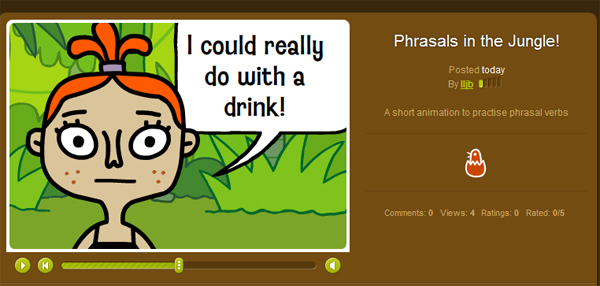
Phrasals in the Jungle!

Have a look at Phrasals in the Jungle!

ToonDo

I love ToonDo because it’s easy to create cartoons for any topic you like. Students enjoy creating small dialogues or comic strips. Here’s one I created which has a phrasal verbs theme. The cartoons can be easily embedded into your class / student blogs or posted via email.

A Dilemma
Create your own Toon!

PhotoPeach

The last on my list of favourite e-tools to make teaching and learning phrasal verbs fun is PhotoPeach. I was able to create a simple quiz using my own photos. You have to select a synonym out of the 3 options given for the verb in the picture. I hope you enjoy it!

Test your Phrasals! on PhotoPeach

Challenge

I hope I have inspired you to use some of these cool sites with your students. You can adapt them to suit whatever theme you are working with. Why don’t you try one of these out for your next class? I am sure your students would enjoy creating short animations and dialogues or short books or indeed quizzes to test each other on new vocabulary or structures they have learned with you.

Have you had experience with any of these tools? If so, I would love to hear from you to learn how you and your class got on with them!

I would like to thank Shelly for giving me this wonderful opportunity to write for her Cool Sites series. It’s a great honour for me to be here.

Saturday, 20 March 2010

The Power of Images - a Powerpoint Presentation

I would like to present my most recent Powerpoint presentation tutorial via Slideshare on the theme of images. I am still learning the basics, so I decided that "simple" works best as Seth Dickens points out in his excellent "How to Make a Good PowerPoint". I have also read Jeremy Harmer's article called "10 things I hate about Powerpoint" just to inspire me, and I found it very useful. As an addendum, I have just been tweeted this link to a Powerpoint tutorial via @ Seth Dickens. Have a look at this. "Visual Design Basics" from sumeet.moghe. It is very good and its message is cristal clear.

My tutorial shows creative ways to use images and includes a few Web 2.0 tools that I particularly like. I hope you enjoy the show. Click on the "Full" icon for a better view.

Saturday, 6 March 2010

Using PowerPoint to Liberate Myself!

One of my New Year Resolutions was to free myself from the stigma of not ever having produced a Power Point Presentation (PPT) in my whole life. I can now safely say that I have lifted this personal inhibition and well, maybe, there is no stopping me now!! I feel that I must be the last teacher on this planet to have created her own PPT. Why is this? Why did I have such a fear of this particular tool? Was it because all the PPTs I have seen from colleagues and in my PLN look so wonderful and professional? The inexplicable fear of falling flat on my face with my own creations was preventing me from unleashing my creativity? Who knows?

Create your own Animation

www.fodey.com/talkingcats

Credit Due
Reading motivational posts such as Karenne Sylvester's "Powerpointing Grammar" or recently, Shelly Terrell's post on "Conquer your Fear" , and also watching this excellent tutorial from TeacherTraining videos by Russell Stannard, have definitely all played a part in my determination to "beat the fear and do it anyway". I have already published "Images4Education" and "Digital Story" on Slideshare. I now have the courage to post my very first attempt at a PPT, tentatively begun in a sandbox area in November 2009.


Learning and Sharing
Other projects I am working on at the moment that I would like to share involve using more images, and phrasal verbs, my favourite teaching subject. I am currently developing a PPT on Google Docs, which I have recently been using with my fellow coursemates from my Moodle4Teachers course, Radney from Canada and Elyse from the Canary Islands. The exciting world of creating PPTs via Google Docs and editing them simultaneously is something the three of us have been doing for quite a while now during our eagerly anticipated weekly meetings via Skype and Googlewave. Up until last week, I had only ever edited existing Google Docs PPTs for our course work, but we had an impromptu teaching tutorial (at 11pm my time!) and I actually learned all about creating a new document, changing the background, the design and other key features. It was a great "learning and sharing" evening! This is what 2010 is all about for me personally so far, and it is truly the most fantastic feeling in the whole world. In fact, "Learning and Sharing" is happening 24/7 right now at this very minute, via Twitter for example.

Sites about PowerPoint Presentations
Pete's Power Point Station - a fantastic collection of free Presentations in PPT format for teachers and students, which includes free interactive activities for kids (found via my Twitter PLN)and on Free Technology for Teachers.
How to Create a PowerPoint Presentation from WikiHow.com.
View the following video "How to make a good PowerPoint" by Seth Dickens.


As you can see after watching the excellent tutorial above, I have got a huge amount to learn!!!

You can also view Seth Dickens' excellent blog post and lesson ideas on "Death by PowerPoint".

As an addendum, I have just been tweeted this link to a Powerpoint tutorial via @ Seth Dickens. Have a look at this. "Visual Design Basics" from Sumeet.moghe.
It is very good and its message is cristal clear.